 Expense Khata
What’s new
New in Expense Khata
Every release, newest first. Update from Google Play to get them; the app also lists what is new under the bell on Home.
Version 1.8.0
-
Bank loans and EMIs
Home, personal, car, education and gold loans. Enter the amount, rate and months (or your bank’s EMI) and the app keeps the schedule, records each EMI with its interest on the due date, and reminds you the day before. The processing fee with GST, insurance premium and pre-EMI interest all count, so a finished loan shows the total paid, the extra above the loan and the real yearly rate. One running loan free; more loans, part payments, rate changes and the PDF are Premium.
-
Part payments, rate changes and closing early
Pay part of a loan and choose fewer EMIs, a smaller EMI or the new EMI your bank gave you. Record a floating-rate change the way your bank applied it. Close a loan with the bank’s foreclosure interest and charges. Premium.
-
A loan you already have
Add a running loan from where it stands today, or with the part payments already made. Home shows how much you still owe on your loans.
-
Plan the month on one screen
The Budget Planner now starts from your income, takes out loan EMIs, bills and what you want to save, and shows what is yours to spend, about so much a day. Category limits are optional: add them only where you overspend.
-
Your savings journey
Savings History follows each month’s savings through the year: what you kept, which month’s savings a short month used, and what is still there. Free.
-
A quicker Add and a searchable More
The + button offers Add a transaction or Scan & Pay. Add uses category tiles and keeps tags, receipts and whose money it was under More details. More has a search box, your recent screens and a Money tools group. Loan entries are grouped in Transactions.
-
Khata AI knows the screen you are on
Open Khata AI from Budget, Loans, Accounts or any other screen and it starts with questions about that screen. New questions: how much you still owe on loans, your next EMI, when your loans end, and who owes you money.
-
Three calm games in Relax Zone
Pop bubble wrap, light diyas, or water a garden that grows a flower for every no-spend day and every buy you skipped. Free.
-
A saving quote a day
A short line on Home about saving, a new one each time you open the app, and one after a buy you marked as a want.
Version 1.7.0
-
Safe to spend
Home shows what you can spend each day until month end, after your savings target and the bills and EMIs still due, with the working shown.
-
“Worth it?” and what was not needed
One tap after an expense says whether it was worth it, and the app adds up what was not needed each month. Essentials like groceries and fuel are never asked.
-
“I skipped it” and your savings jar
Didn’t buy something after all? Log it and the money goes into your savings jar. Big buys can wait 48 hours with a reminder.
-
Weekly limits and a weekly review
Give any category a weekly limit, and look back at the week in two minutes.
-
Money check
Type your real cash and bank balances; any gap is spending you forgot to add. Add what it was, or mark it as unknown.
-
Habits, subscriptions and saving ideas
Insights points out repeat spends, late-night and weekend habits and subscriptions you may not use, and suggests what to cut, with the yearly saving if you halved it. One idea free; all three, patterns and the subscription check with Premium.
-
Bills before payday and pay yourself first
See which bills fall before your next salary, add a payment you make every month as a bill in one tap, and when income arrives, set some aside for your goals first.
-
Goal photos, challenges and badges
Add a photo to a savings goal, take on a no-spend-day challenge, earn badges, and share a month-end story card that shows percentages, never amounts.
-
Khata AI: “Can I afford this?”
Type an amount and Khata AI checks it against what is left this month after your savings and bills.
-
A faster app
Home and lists update only what changed after you save, so screens redraw sooner.
Version 1.6.2
-
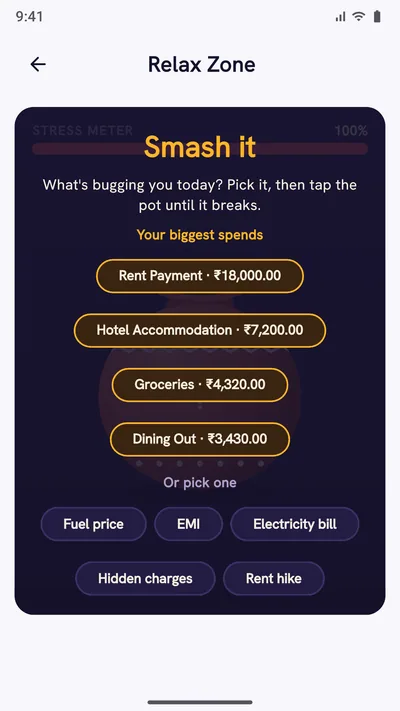
Relax Zone
Smash a pot labelled with a frustration (your biggest spends first, tougher pots for bigger bills, hand, chappal or hammer, and a stress meter), let worries go on sky lanterns, or take a guided 4-2-6 breath. Free.
-
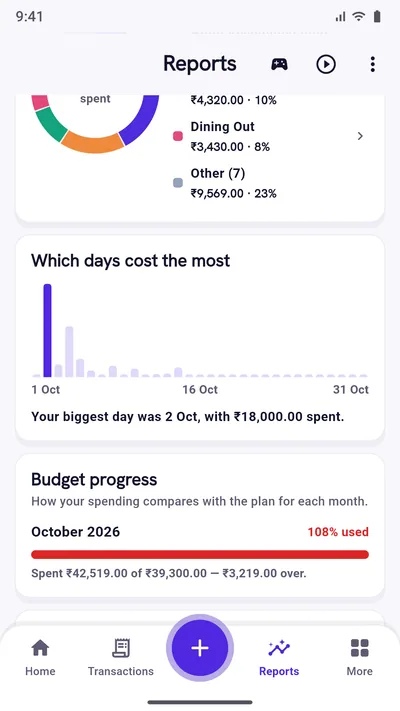
Reports, redesigned as one page
Period chips with Compare and Filters, the month at a glance with exact amounts, a short comparison with last month, a ring of where the money went, which days cost the most, and budget, income, accounts, events and people only when there is such data.
-
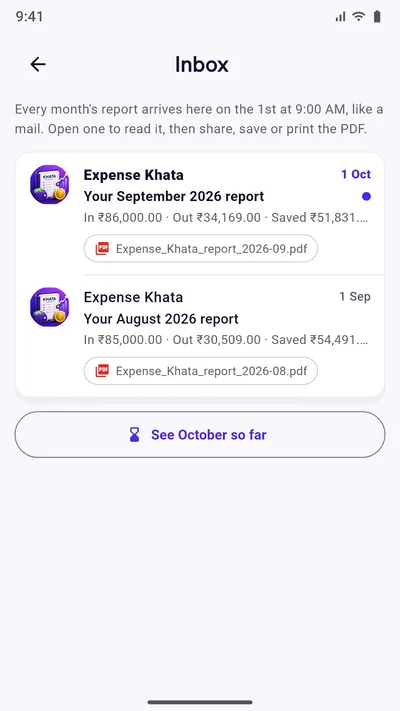
Your monthly reports in an Inbox
Every month’s report arrives on the 1st, like a mail, as a PDF to read, share, save or print. Premium.
-
Monthly email report
Optionally, the same PDF in your email on the 1st, sent only to your own Google account. Premium.
-
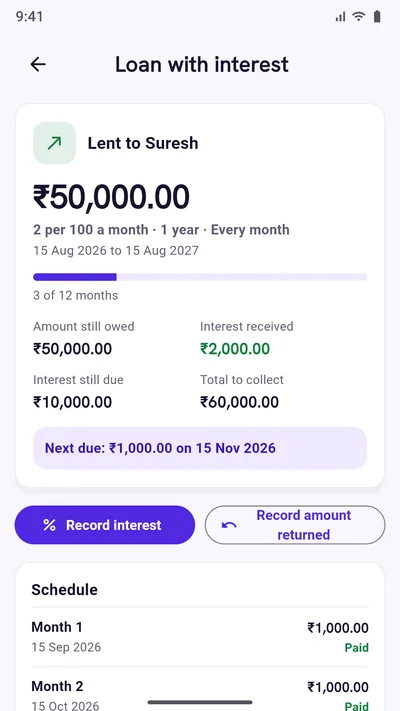
Loans with interest
Lend or borrow at so much per 100 a month. See what is due each month, record interest and money returned, and get a reminder on every due date. Premium.
-
Pay-back reminders
Add a pay-back date when you borrow or lend, and get a reminder that day at the time you pick. The loan shows as Paid once it is returned. Free.
-
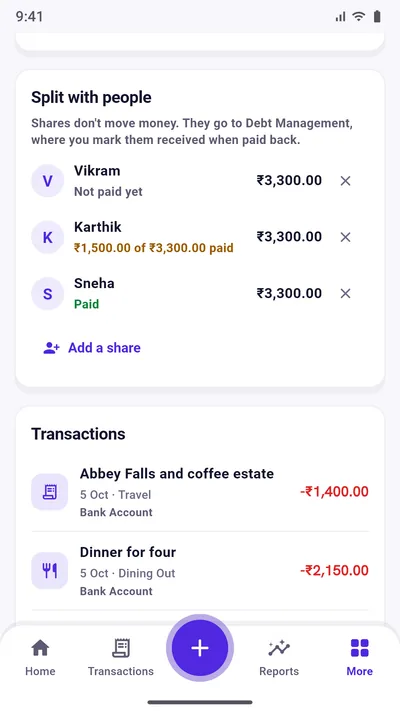
Who has paid in events
Split an event’s costs and see each person’s share as Paid, part paid or Not paid. Premium.
-
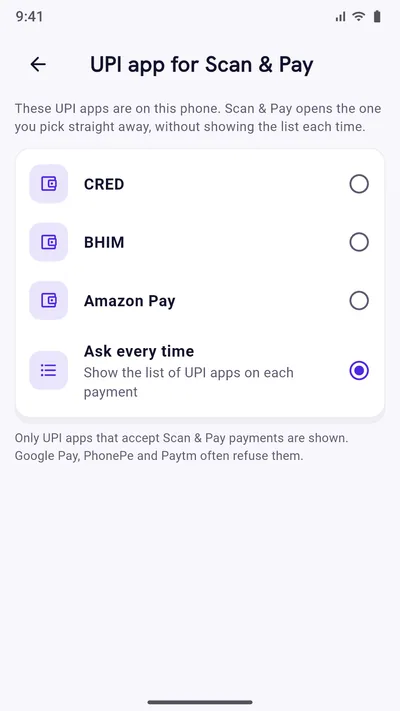
Your UPI app for Scan & Pay
Choose the UPI app Scan & Pay always opens, so you skip the list each time.
-
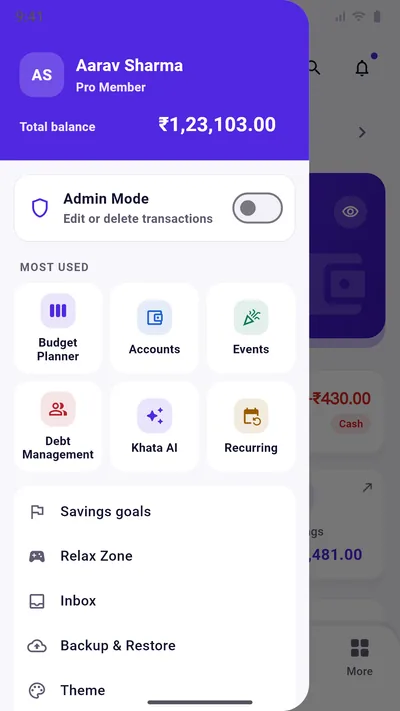
Quick menu and clearer details
Open the menu from Home, Transactions and Reports. Each transaction opens in a cleaner details page, and accounts show their bank’s badge.
-
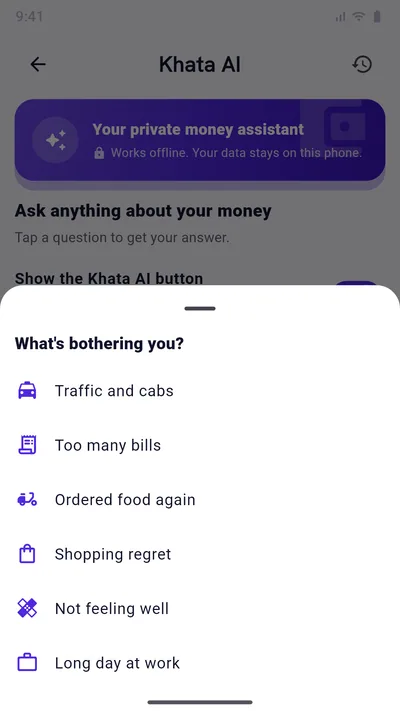
Khata AI: “Rough day?”
Tell Khata AI what is bothering you, from traffic to too many bills, and get a kind word and a quick way to log it.
-
Festival greetings and video guides
A greeting on Diwali, Holi, Eid, Onam and other festivals with a useful next step (you can turn it off), and short video guides inside the app.
Version 1.6.0
-
Choose where backups go
Your phone or Google Drive, explained side by side, with a Drive backup card on Backup & Restore.
-
Drive stays signed in
Back up now and Restore use the account you signed in with, without the account picker each time, until you sign out.
Version 1.5.0
-
Ten Premium themes
Ocean Blue, Peacock Teal, Lotus Pink, Aurora Glass, Galaxy, Sunset Glow, Midnight Gold, Wallet Cards, Doodle Notebook and Retro Terminal, plus the free Original.
-
Safer phone backups
Android’s own Google backup now carries your records and settings, receipt photos are offered back after a restore, and the phone backup folder is called “ExpenseKhata Backup - Do not delete”.
Start with today’s spending.
Free on Google Play. No sign-up, and your records stay on your phone.
Android 7.0 or newer. Free with ads; Premium is an optional one-time purchase.