 Expense Khata
Khata AI · Private money assistant
Ask about your money. The answer comes from your own records.
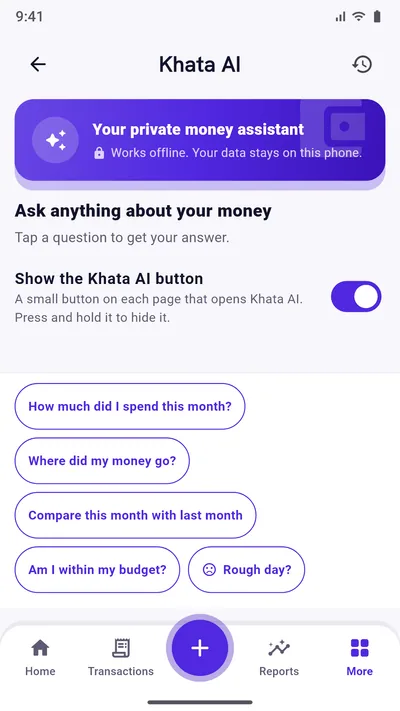
Khata AI is a private money assistant inside Expense Khata. Tap a question like “How much did I spend this month?” and it works out the answer from the records on your phone, in plain words. No internet, and nothing is sent anywhere.
- Works offline
- Nothing leaves your phone
- Part of Premium
How it works
Tap a question. Read the answer. Go where it points.
There is nothing to type and nothing to set up. Khata AI reads the same records you add in the app.
Questions ready to tap
More than 45 questions about spending, income, budgets, accounts, cards and habits. Some ask you to pick a category, month, account or card first.
Questions about the screen you are on
Tap the Khata AI button on Budget, Loans, Accounts, Savings or any other screen, and it starts with questions about that screen, such as “When is my next EMI?” on Loans.
Your usual questions first
Khata AI learns which questions you ask most, including what you pick for them, and puts those first. New users start with the most useful ones.
Answers in plain words
Each answer is a short sentence with the figures behind it, such as the top categories or the change since last month, plus follow-up questions.
One tap to the right screen
Answers lead on: “See transactions” under a spending answer, “Open budget” under a budget one, “Add income” under an income one.
Pin a question to your home screen
Ask a question you check often, then tap “Add to home screen”. It gets its own icon that opens Khata AI with the answer, after your PIN if you set one. Android 8 and newer.
Open it from the app icon
Long-press the Expense Khata icon and choose Khata AI, next to Add expense, Add income and Add transfer.
Rough day?
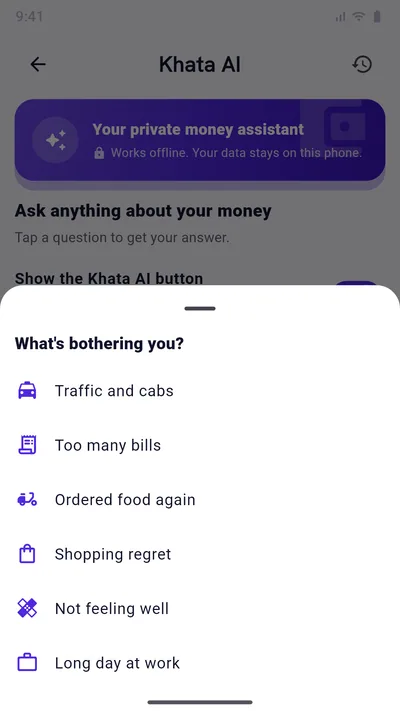
Tap “Rough day?” and pick what is bothering you, from traffic and cabs to too many bills. Khata AI answers kindly and offers to log the cost in one tap.
Matches your theme
Khata AI follows the theme you pick, from Original to Wallet Cards or Retro Terminal, like the rest of the app.
History stays on your phone
The questions you ask are kept on this phone, day by day, so you can ask them again or clear them. Answers are worked out fresh each time.
What you can ask
A few of the questions
Spending
- How much did I spend this month?
- Where did my money go?
- How much did I spend on a category?
- What were my biggest expenses?
Compare
- Compare this month with last month
- Which category grew the most?
- How much did I spend last month?
Budget
- Am I within my budget?
- How much can I spend per day for the rest of the month?
- Which category is over budget?
Accounts and cards
- What are my account balances?
- How much do I need to pay on my cards?
- When is my card due date?
Loans and udhar
- How much do I still owe on my loans?
- When is my next EMI?
- When will my loans be paid off?
- Who owes me money?
Before you buy
- Can I afford this?
Habits
- Which day did I spend the most?
- How many days did I not spend anything?
- What is my savings rate?
Events
- How much did an event cost?
- What did my events cost?
Card and budget questions appear once you have added a credit card or set this month’s budget.
Read this first
What Khata AI is not
- Not an online chatbot. It does not send your questions or records to an AI service. Every answer is calculated on your phone from your own records, so it cannot invent a figure.
- Not a free-text chat. You choose from its list of questions instead of typing.
- Not financial advice. It tells you what your records say. Decisions are yours.
- Only as good as your records. Spending you have not added cannot show up in an answer.
Questions
Good to know
Is Khata AI free?
Khata AI is part of Premium, the one-time purchase that also removes ads. Free users can see what it offers in the app.
Does Khata AI need internet?
No. It works with no connection at all, on a flight or with no data pack.
Does Khata AI send my data to an AI company?
No. Nothing leaves your phone. The answers are worked out by the app from the records stored on your phone.
Can I type my own question?
Not at the moment. You pick from more than 45 ready questions, and Khata AI moves the ones you ask most to the front.
How do I put a question on my home screen?
Ask the question, then tap “Add to home screen” under the answer and confirm on your phone. Tapping the new icon opens Khata AI and answers it. This needs Android 8 or newer and a launcher that allows shortcuts.
Can I clear what I asked?
Yes. Open the history in Khata AI to see your questions day by day, and clear a day or everything.
Start with today’s spending.
Free on Google Play. No sign-up, and your records stay on your phone.
Android 7.0 or newer. Free with ads; Premium is an optional one-time purchase.