 Expense Khata
Events · Trips, weddings and festivals
See what the whole occasion cost, not just one bill
A Goa trip is hotels, food, cabs and tickets, paid from three accounts over five days. Expense Khata groups all of it under one event, so the total is one tap away and nothing is counted twice.
- Works offline
- Never moves money
- Private to your phone
How it works
Make an event, then spend as usual
An event is a name, a start date and, if you like, an end date. Everything you add while it is running goes on it.
Any category, any account
Hotel on a card, food in cash, cabs by UPI: put them all on one event and see the total, however you paid.
Picked for you while it runs
While an event is happening, new transactions start on it, with a note saying why. Change it or choose no event before saving, or turn this off.
On Home while it lasts
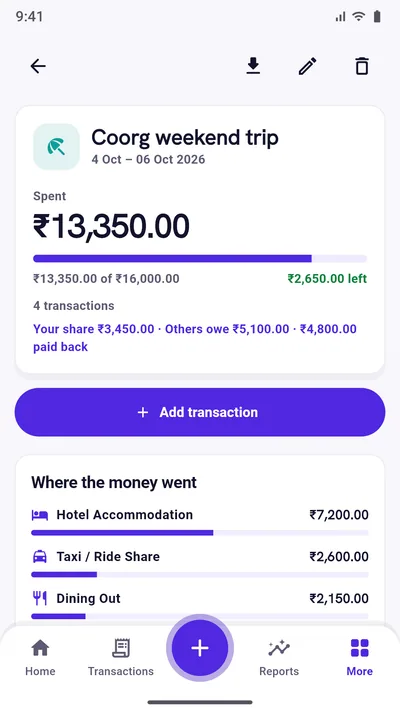
A card on Home shows “Day 2 of 4” and what the event has cost so far. It disappears once the event is over.
Money received kept apart
Cash gifts at a wedding or a refund are shown as money received, never subtracted from what the occasion cost.
A budget for the occasion
Set what you plan to spend and watch what is left. The bar turns red with “over budget” if it goes past. (Premium)
Where the money went
See the event by category and day by day, and export it as a CSV you can import again. (Premium)
Split with people
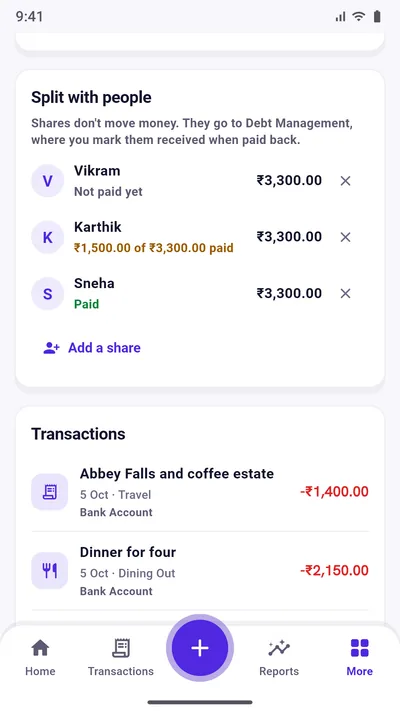
Paid the hotel for three? Note what each friend owes. Their shares go to your udhar khata, the event shows each one as Paid, part paid or Not paid, and you see your own share. (Premium)
Ask Khata AI
Ask “How much did an event cost?” or “What did my events cost?” and get the answer from your own records, offline. (Premium)
Good to know
What an event does not do
- It never moves money. An event only groups transactions. Your account balances are exactly what they would be without it.
- Deleting an event keeps its spending. The transactions stay where they are, just no longer grouped.
- Shares are not payments. Splitting records what someone owes you. It does not send, request or collect money from anyone.
Questions
Good to know
Is the Events feature free?
Yes. Making events, adding transactions to them, the Home card and the suggestions while an event runs are free. Budgets, the category and day breakdowns, export and splitting with people are part of Premium.
Can a transaction be on two events?
No. Each transaction belongs to one event at most, so no spending is counted twice.
How does splitting work?
On the event, add who owes you and how much. It appears in Debt Management under that person. When they pay you back, mark it received there as usual. The event shows your share: what it cost, less what others owe.
Does it work offline?
Yes. Events, like everything else in Expense Khata, are kept on your phone and work with no connection.
Start with today’s spending.
Free on Google Play. No sign-up, and your records stay on your phone.
Android 7.0 or newer. Free with ads; Premium is an optional one-time purchase.