 Expense Khata
Budget planner for Android
A monthly budget you can see, not just plan
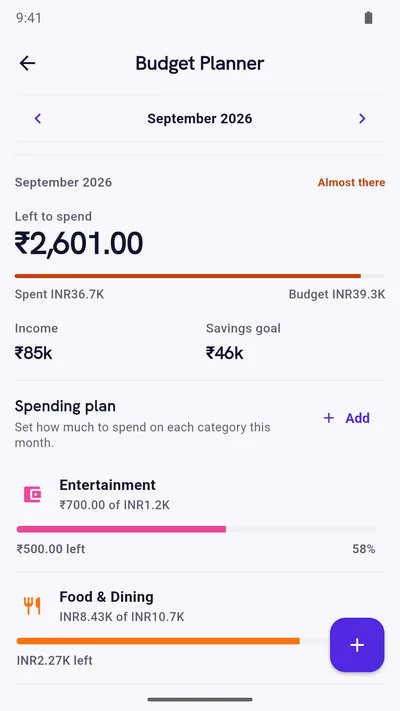
Set what you expect to earn, give each category a limit, and watch “left to spend” change as you record expenses. Overspending shows up while you can still do something about it.
- Plan each month independently
- Early warnings
- Free on Google Play
How the planner works
Income, limits, and one number that matters
Plan each month on its own
Every month has its own income, limits and savings goal, so a festival month or a new rent does not distort the rest of the year.
Category limits with progress
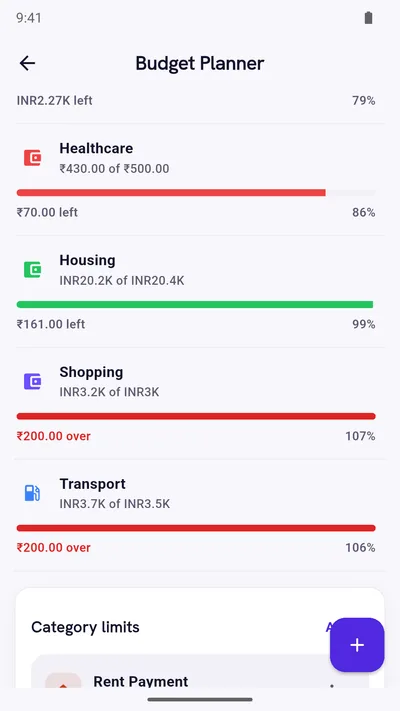
Give Groceries, Dining Out or Fuel a monthly limit and see progress bars turn from green to amber to red as you spend.
Groups for related spending
Put related categories under one shared limit, for example all food spending, when the exact split does not matter.
Left to spend
One headline number: what you have not yet used of this month’s plan. It updates as you add expenses.
A heads-up at 80%
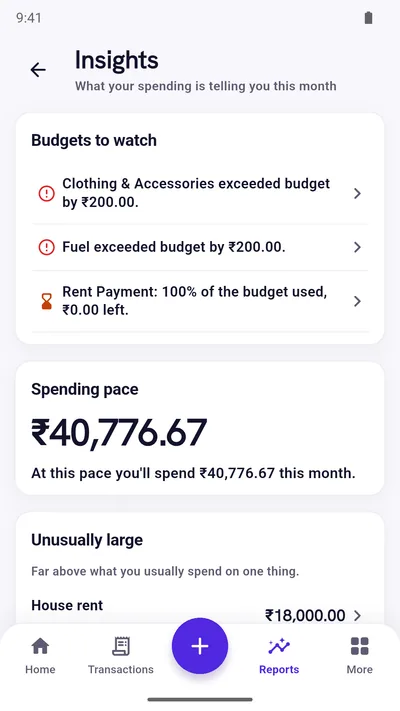
When a budget is nearly used, you get a note after saving an expense and in Insights. If a new expense would exceed the limit, you are asked before it is saved.
Health tips for the month
A short read on whether your plan and your spending line up, based on what you have actually planned.
Plan against reality
Budgets that use your real spending
The planner does not ask you to enter spending twice. Every expense you record is matched to its category, so each limit shows what you have really used.
- Over a limit? The overspend shows in red as a clear amount.
- Budgets to watch are listed at the top of Insights.
- Set a savings target for the month and compare it with what you keep.
Set one up
A first budget in three steps
- Look backCheck last month’s report to see what you actually spent in each category.
- Set limitsCover fixed costs first, then give 4 to 6 flexible categories a limit you can live with.
- Check in weeklyOpen the planner once a week. Adjust limits if life changed, not to hide overspending.
New to budgeting? Try the 50/30/20 rule with a worked ₹60,000 example or the 15-minute monthly budget guide.
Questions
Good to know
What is a good monthly budget?
It depends on your income, rent and family. A common starting point is the 50/30/20 rule (needs, wants, savings), then adjusting to your real costs. Expense Khata does not tell you what to spend; it shows how your plan compares with your spending.
What happens when I go over a category limit?
The category turns red and shows how much you are over. Before you save an expense that would go over, the app asks you to confirm, so you decide knowingly.
Can I budget for one month without affecting others?
Yes. Each month is planned independently, so changing October does not change September.
Is the budget planner free?
Yes. The Budget Planner is part of the free app. Premium only removes ads and adds PIN lock, Google Drive backup and custom categories and tags.
Start with today’s spending.
Free on Google Play. No sign-up, and your records stay on your phone.
Android 7.0 or newer. Free with ads; Premium is an optional one-time purchase.