 Expense Khata
Scan the QR · Pay with your UPI app
Pay by UPI. The expense is already written down.
The hardest expenses to remember are the small UPI payments. With Scan & Pay you scan the QR inside Expense Khata, pay with your usual UPI app, and the expense is saved the moment the payment goes through.
- Your UPI app does the payment
- We never see your UPI PIN
- Part of Premium
How it works
Scan, pay, done. Details whenever you like.
Scan & Pay does not replace your UPI app. It opens it with the payee and amount filled in, and writes the expense down for you.
Scan any UPI QR
Point the camera at a shop’s QR, or pick a photo of a QR from your gallery. The code is read on your phone; no photo is kept.
Check before you pay
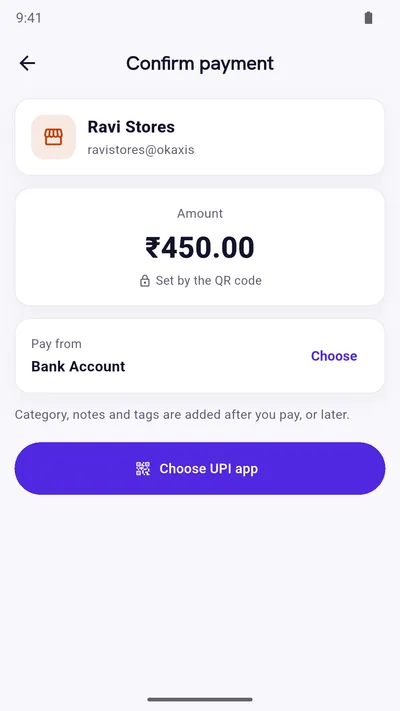
See who you are paying and how much, and choose which of your accounts the money comes from. A QR with a fixed amount keeps that amount.
Pay with your UPI app
Choose a UPI app installed on your phone. It opens with everything filled in, and you pay there with your own UPI PIN.
Saved the moment it succeeds
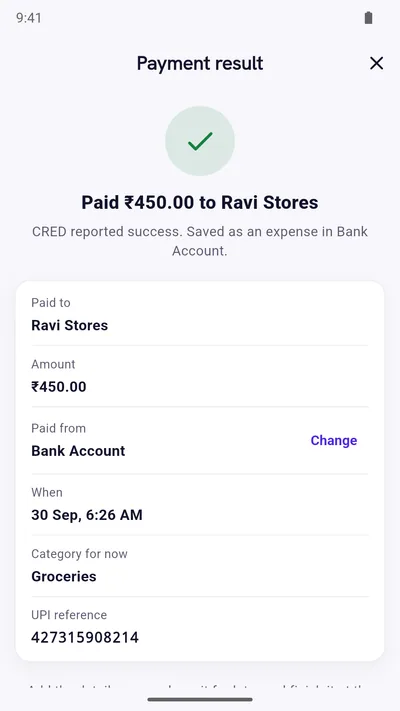
When your UPI app reports success, the expense is saved straight away with the payee, amount and UPI reference, so balances are right at once.
Add details now, or later
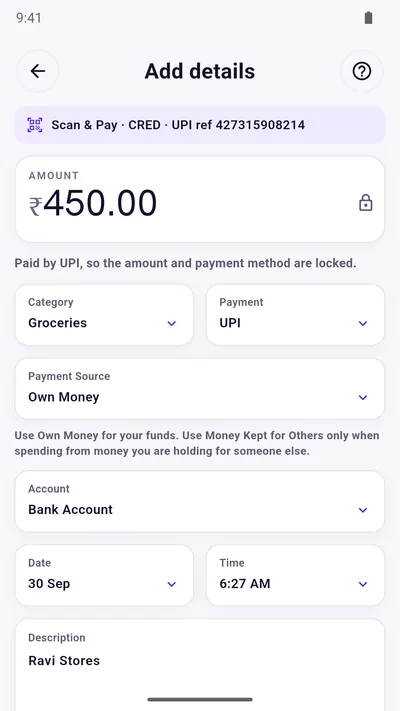
Add a category and note right away, or tap Later. If you do nothing for 10 seconds, Later is chosen for you. Payments waiting for details are listed on Home.
Wrong account? Change it
Paid from a different account than you picked? Change it on the result screen and both account balances are corrected.
See it step by step
One payment, from QR to expense
Real screens from the app, following one ₹450 payment to a shop.
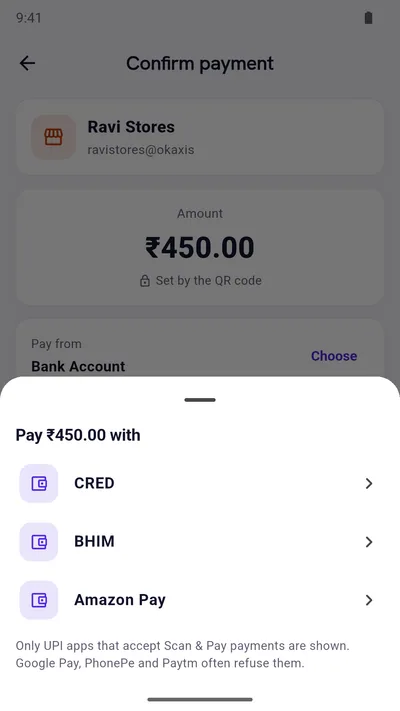
Screenshots show sample data. On your phone, the list shows the UPI apps you have installed, with their own icons.
When a payment is unclear
Nothing is lost, and nothing is counted twice
UPI apps do not always report back clearly. Expense Khata keeps every attempt safe and lets you decide what really happened.
- No answer from the UPI app? Say whether you paid, or ask to be reminded tomorrow. Until then it waits in Pending payments.
- Payment failed but money was taken? Mark it, and it is tracked in Pending payments while your bank reverses it, which usually happens within a working day.
- Your UPI app blocks payments started from other apps? Pay inside the UPI app instead, and Expense Khata still logs it.
Works with
UPI apps that accept payments from other apps
Scan & Pay lists the supported UPI apps you have installed, such as BHIM, BHIM SBI Pay, CRED, Amazon Pay, MobiKwik, Navi, super.money, WhatsApp Pay, iMobile Pay (ICICI), Axis Mobile and HDFC Bank.
Some popular UPI apps do not accept payments started from another app. For those, choose “Pay directly”: you pay inside your UPI app as usual, and Expense Khata still records the expense.
App names are trademarks of their owners. Expense Khata is not affiliated with NPCI or any UPI app or bank.
Read this first
What Scan & Pay is not
- Not a payment app. Expense Khata does not send, receive or hold money. Every payment is made inside the UPI app you choose, by that app and your bank.
- Never asks for your UPI PIN or bank details, and never sees them.
- Not responsible for failed or reversed payments. Always check the status in your UPI app and raise complaints with that app or your bank.
- Private. The payee, amount, UPI app and reference are kept on your phone (and in backups you make), only to record your expense.
The first time you open Scan & Pay, the app shows these points and asks you to confirm you have read them.
Questions
Good to know
Does Expense Khata process my UPI payment?
No. It only opens a UPI app on your phone with the payee and amount filled in. The payment happens entirely in that app, with your UPI PIN, between that app and your bank.
Which UPI apps can I use?
Supported apps you have installed are listed when you pay, such as BHIM, CRED, Amazon Pay, MobiKwik, WhatsApp Pay and several bank apps. If your app blocks payments started from other apps, use “Pay directly” and the expense is still recorded.
What if the payment is pending or the app does not answer?
You can say you paid, say you did not, or ask to be reminded tomorrow. Unclear payments wait in Pending payments, so nothing is lost and nothing is saved twice.
Is the expense saved before I add a category?
Yes. A successful payment is saved at once, marked “details needed”, so your balances are right immediately. Add the category and note now or later from Home.
Is Scan & Pay free?
Scan & Pay is part of Premium, a one-time purchase that also removes ads. You can still add UPI expenses by hand in the free app.
Start with today’s spending.
Free on Google Play. No sign-up, and your records stay on your phone.
Android 7.0 or newer. Free with ads; Premium is an optional one-time purchase.