 Expense Khata
Monthly report · Inbox · Email
Last month’s report, waiting for you on the 1st
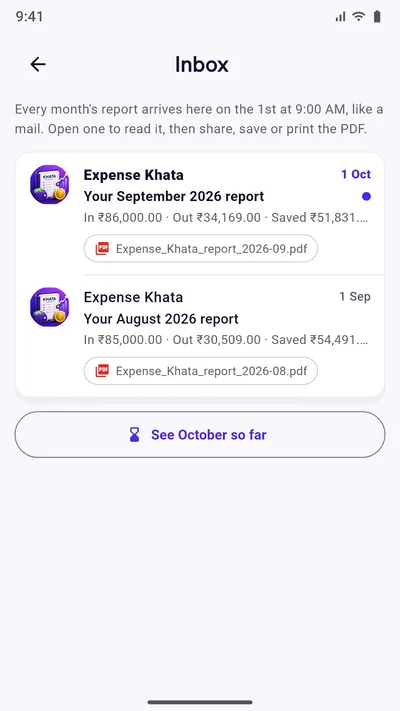
You should not have to build a report to know how a month went. On the 1st at 9:00 AM, Expense Khata puts last month’s report in its Inbox, like a mail: what came in, what went out, how the budget held up and every transaction, ready as a PDF.
- Made on your phone
- PDF to share, save or print
- Part of Premium
How it works
A report for every month, like mail
Nothing to set up. The Inbox fills itself from the records you already keep.
Arrives on the 1st
At 9:00 AM on the 1st, last month’s report lands in the Inbox, unread, and a notification tells you it is there. Months from before you started are there too, already read.
The whole month in one PDF
Money in, money out and what you kept, your budget category by category, where you spent more than the month before, and every transaction.
Share, save or print
Open a report to read it, then share the PDF on WhatsApp or email, save it to your files, or print it for the family file.
See this month so far
Do not want to wait for the 1st? “See October so far” shows the month under way in the same layout.
Or have it emailed
Turn on the monthly email report and the PDF also arrives in your Gmail on the 1st, sent only to the Google account you use for Drive backup.
Nothing stored, nothing uploaded
Each report is made fresh on your phone when you open it. The Inbox only remembers which months arrived and which you read.
Read it in a minute
The month at a glance, then the detail
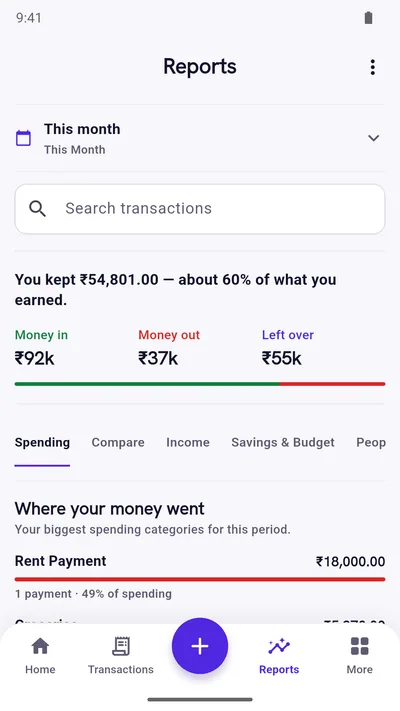
The report starts with the three numbers that matter, then goes as deep as you like, in the same plain sentences as the Reports screen.
- “You kept ₹43,481, about 51% of what you earned.”
- Each budget category with its limit, what you spent and what is left or over.
- Categories that went up since last month, biggest change first.
- Every transaction of the month, by date.
Monthly email report
The same report in your email, if you want it
Under More, open Monthly email report and switch on “Email my report every month”. On the 1st, some time between 9:00 AM and noon, the PDF is emailed from Expense Khata’s address to the Google account you signed in with for Drive backup. You can also send last month’s report now, or save it as a PDF without sending anything.
How it stays private: the PDF is made on your phone and passed through our small report mail server only to be emailed to you. The server checks with Google that the address is really yours, sends it to that address alone, and keeps neither the report nor your address. The full detail is in the privacy policy.
Questions
Good to know
When does the monthly report arrive?
On the 1st of every month at 9:00 AM, for the month that just ended. If your phone was off, it is there the next time you open the app.
Is the monthly report free?
The Inbox lists every month, but opening a report, its PDF and the email report are part of Premium, a one-time purchase that also removes ads. This month’s Reports screen stays free.
Is the report uploaded anywhere?
No. It is made on your phone each time you open it, and nothing is stored or sent. Only if you turn on the email report is the PDF passed through our mail server to your own email address, and the server keeps nothing.
Which email address does it go to?
Only the Google account you signed in with for Google Drive backup. The first time, Google asks you to let Expense Khata see that account’s email address, so the report cannot be sent anywhere else.
Can I get a report for an earlier month?
Yes. Every month with transactions is in the Inbox. Open one and share, save or print its PDF.
Start with today’s spending.
Free on Google Play. No sign-up, and your records stay on your phone.
Android 7.0 or newer. Free with ads; Premium is an optional one-time purchase.