 Expense Khata
Expense tracker · Budgets · Udhar khata
Know where your money goes. Keep your records private.
Expense Khata is a free expense tracker and budget planner for Android. Add spending in a few taps, set monthly limits, keep track of who owes you, and read what it all means in plain sentences.
- Works offline
- No sign-up
- Scan a UPI QR and pay through the app with your phone’s supported UPI apps
- Records stay on your phone
- English + 10 Indian languages
Your monthly report, in an Inbox
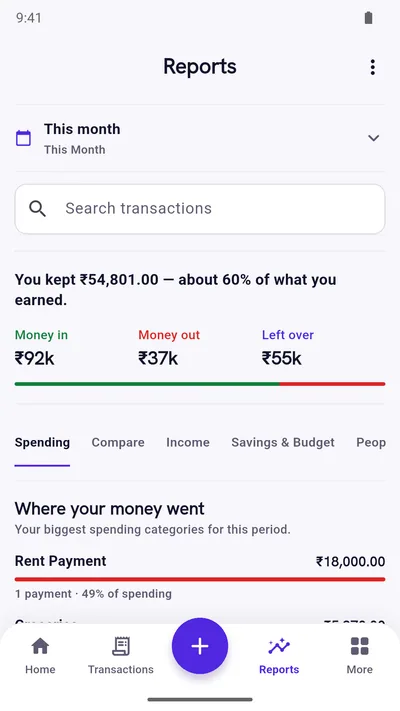
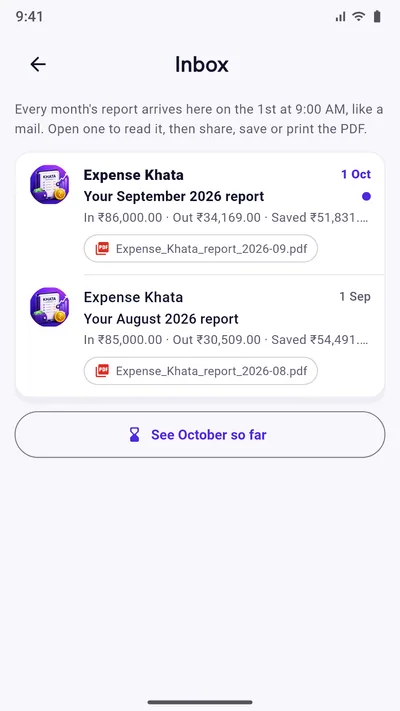
On the 1st, last month’s report arrives like a mail: totals, budget, where you spent more and every transaction. Read the PDF, share or print it, or have it emailed to you.
Monthly report Inbox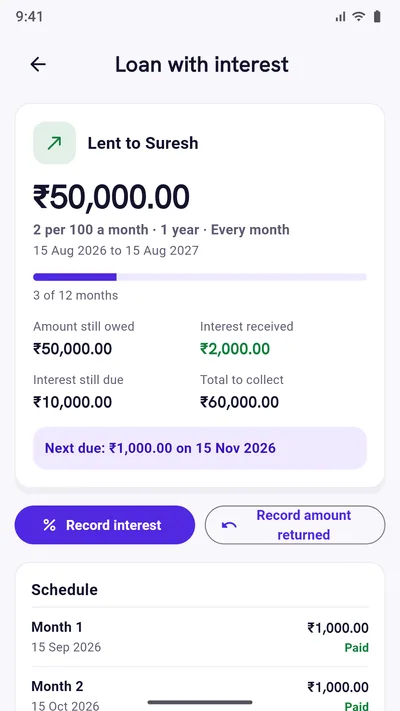
Loans with interest, worked out for you
Lent or borrowed at ₹2 per 100 a month? See what is due each month, record interest and money returned, and get a reminder on every due date.
Loans with interestReports you read top to bottom
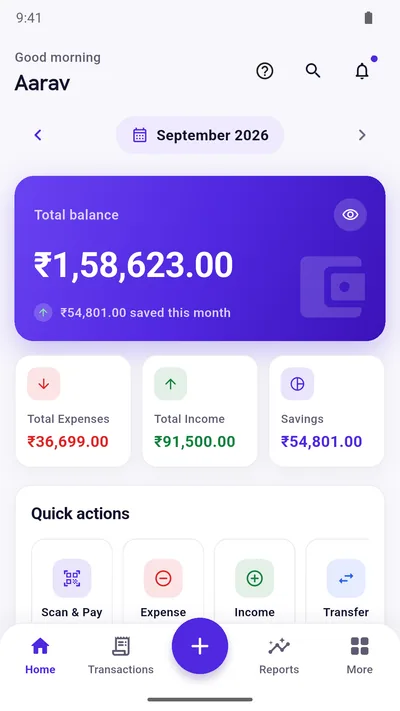
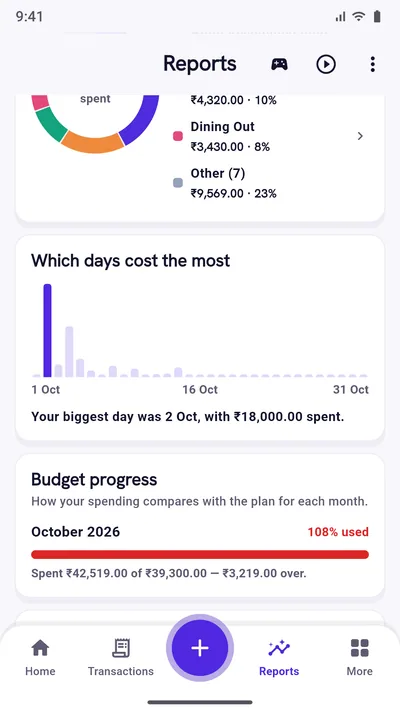
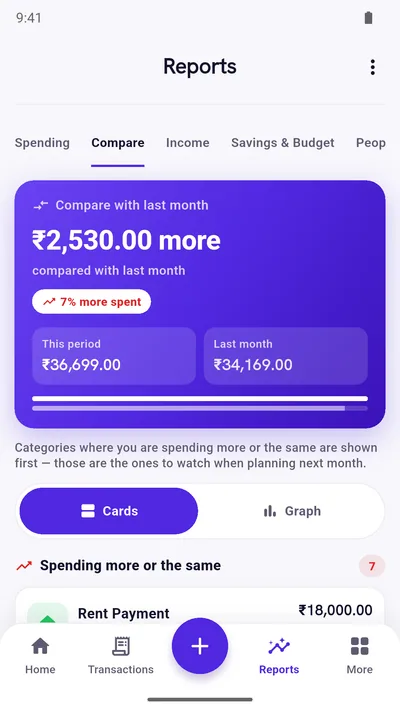
The month at a glance in exact amounts, a short comparison with last month, a ring of where the money went and the days that cost the most.
Reports and Compare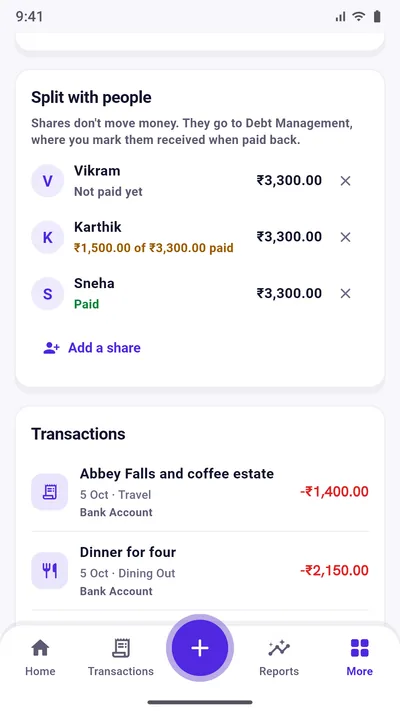
See who has paid for the trip
Split an event’s costs and see each friend’s share as Paid, part paid or Not paid. Shares wait in your udhar khata until they are settled.
Events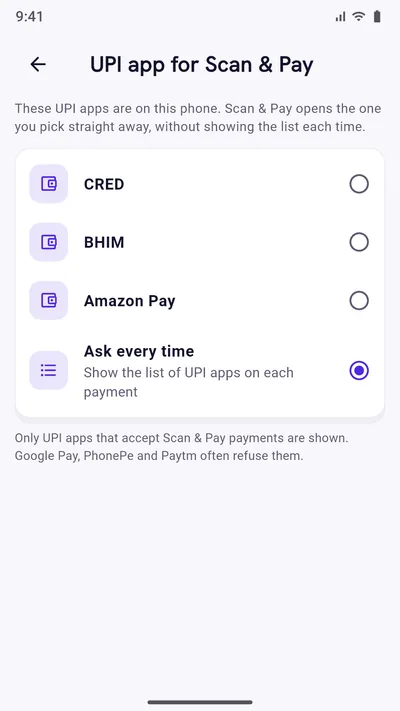
Scan & Pay opens your own UPI app
Pick the UPI app you always use, and Scan & Pay opens it straight away, without the list each time. The expense is still saved for you.
Scan & Pay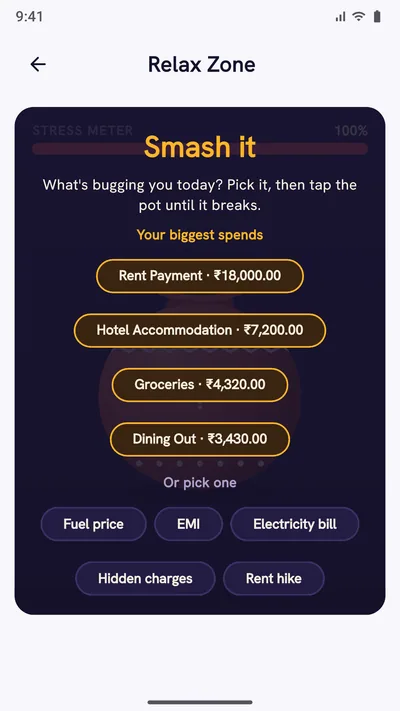
Relax Zone: a minute off from money stress
Smash a pot labelled with your biggest spend, let worries float away on sky lanterns, or follow a slow 4-2-6 breath. Then log your expenses calmly.
Relax Zone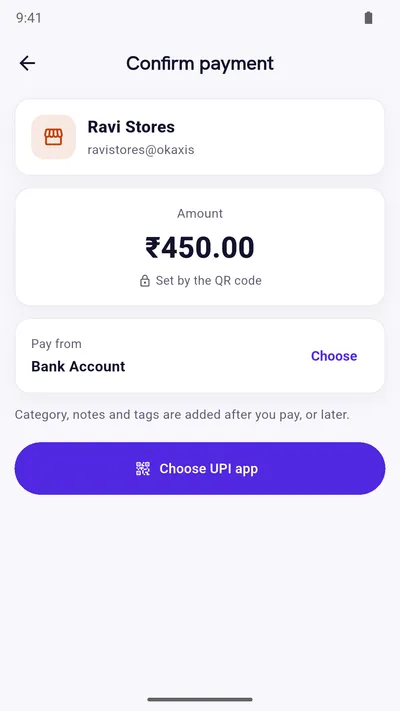
What you can do
Everything a khata should do, without the clutter
Built for daily use: quick to add to, calm to look at, and honest about what your money is doing.
Add spending in a few taps
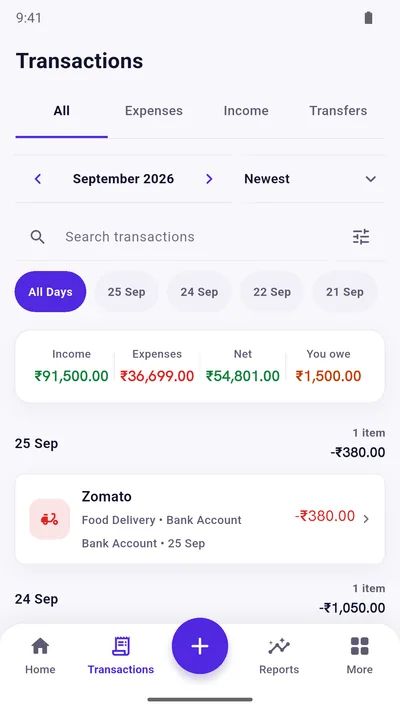
Quick amounts, category tiles and payment methods like UPI, cash and cards, on a short form; tags, receipts and whose money it was wait under More details. The + button offers Add a transaction or Scan & Pay. Add straight from any account or card screen, with that account already chosen. With Premium, add from the launcher shortcuts or the home-screen widget. Deleted entries go to Trash, not into the void.
Scan & Pay with UPI
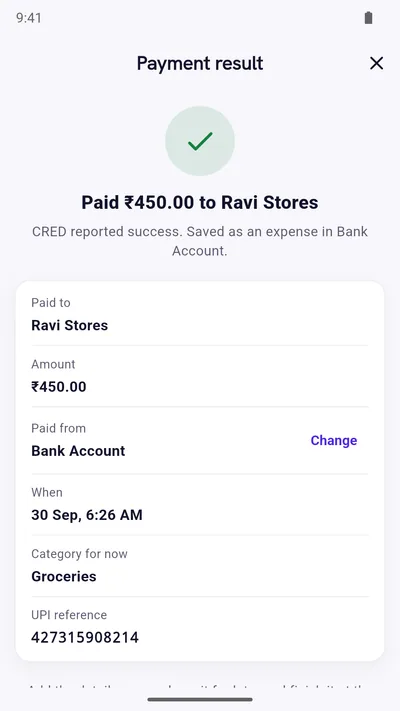
Scan a UPI QR, pay with your UPI app, and the expense is saved for you. It checks your internet first and warns you if the connection is weak. Add the details now or later, change the account it was paid from, and pick the UPI app it always opens. (Three free, then Premium)
Every account as a card
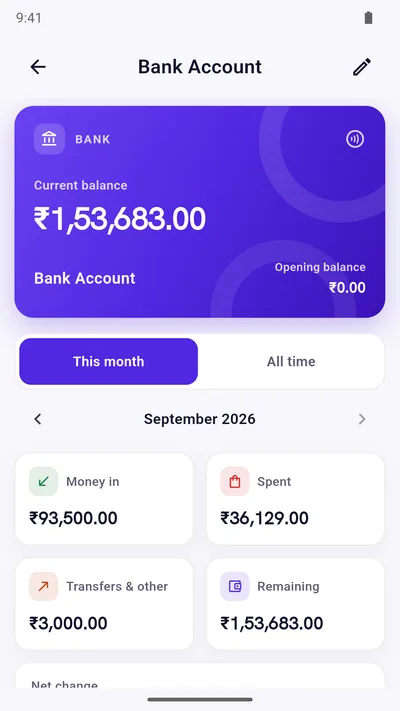
Tap an account to see it as a card: its balance, money in, what you spent, what remains, where it went, and every transaction on it, for a month or all time. See the balance at the start of the month and now, and add a transaction from there in one tap. On Home, swipe the balance card to read each account on its own.
Credit cards, done properly
Set a card up with plain questions (its limit and the total to pay) and see what you can still spend as you type. Log purchases, refunds, fees and interest, pay the bill from your bank and pick the card so both balances update, read your statements, and turn a big purchase into EMIs.
Safe to spend, every day
Home shows what you can spend each day until month end, after your savings target and the bills and EMIs still due, with the working shown: left, minus what you keep, minus bills.
Spot spending you did not need
Tap “Worth it?” after an expense and see a monthly total of what was not needed. Skipped a buy? Log it and the money goes into your savings jar. A weekly two-minute review and weekly limits keep it in check, and a money check compares your real balances to find spending you forgot to add.
Plan the month on one screen
Start from your income, take out loan EMIs, bills and what you want to keep. What is left is yours to spend, about so much a day. Add a limit only for the categories where you overspend, and get a warning before an expense would go over.
Bank loans and EMIs
Home, personal, car, education or gold loans: the EMI worked out, each EMI recorded with its interest, a reminder the day before, the fee, GST and insurance counted, and what the loan really cost when it ends. One running loan free; prepayments, rate changes and more loans with Premium.
Udhar khata, person by person
Record money you lent or borrowed, part-repayments and pay-back dates, with a reminder that day at the time you pick. See exactly who owes what, and since when.
Loans with interest
Lent or borrowed at ₹2 per 100 a month? See what is due each month, record interest and money returned, and get a reminder on every due date. (Premium)
Monthly report Inbox
On the 1st, last month’s report arrives like a mail: totals, budget, where you spent more and every transaction, as a PDF. Have it emailed too, if you like. (Premium)
Reports that read like sentences
One page, top to bottom: “You kept ₹43,481, about 51% of what you earned.” Then a short comparison with last month, a ring of where the money went and the days that cost the most. This month’s reports are free; earlier periods, report export and comparing months are Premium.
Khata AI, your private money assistant
Tap a question like “How much did I spend this week?”, “Can I afford this?” or “When is my next EMI?” and get the answer from your own records, in plain words. Opened from a screen, it starts with questions about that screen. It works offline, shows your most asked questions first, and each answer has a button to the right screen. Pin a question to your home screen to ask it in one tap. (Premium)
Insights that point at something
Your spending pace this month, what changed since last month, unusually large expenses, your busiest weekday and your savings rate. (Premium)
Events: trips, weddings and festivals
Group a whole occasion’s spending across categories, accounts and months, and see what it really cost. While it runs, new expenses go on it and Home shows how far along it is. Budgets, breakdowns and splitting costs with people, with who has paid, are Premium.
Savings goals and your savings journey
Name a goal, add a photo of what you are saving for, log the money you set aside, and see the month you would finish at your recent pace. Savings History follows each month’s savings through the year: what was kept, what a short month used and what is still there. Two goals free, more with Premium.
Accounts, recurring and reminders
Track cash, bank, wallet, savings and card balances, with one account of each type free and more with Premium. Daily and weekly reminders are free; recurring rules for rent, salary and subscriptions, added automatically, are part of Premium.
Export, backup and restore
Export all your data or just transactions as CSV and import it back, for free. With Premium, save a full backup file anywhere, or back up to your own Google Drive automatically. No internet? The backup is kept on your phone and goes to Drive the moment you are back online, and a small strip at the bottom of the screen shows its progress.
Sync your devices
Keep your records the same on each device signed in with the same Google account. The sync data stays in your own Google Drive. Off until you turn it on. (Premium)
A look you like
Choose from 11 themes, from the calm Original to Wallet Cards, Doodle Notebook and Retro Terminal. Every screen follows it, down to the balance and account cards on Home. Original is free; the other ten are Premium.
Relax Zone
A minute off from money stress: smash a pot labelled with your biggest spend, let worries float away on sky lanterns, follow a slow breath, pop bubble wrap, light diyas, or water a garden that grows with every no-spend day. Free.
In your language
English, Hindi, Bengali, Gujarati and 7 more, with dates and month names in the language you choose.
Inside the app
Real screens, clear by design
Every screen puts the numbers that matter first, in large type. Swipe through all of it: the monthly report Inbox, loans with interest, who has paid for a trip, Khata AI and Relax Zone.
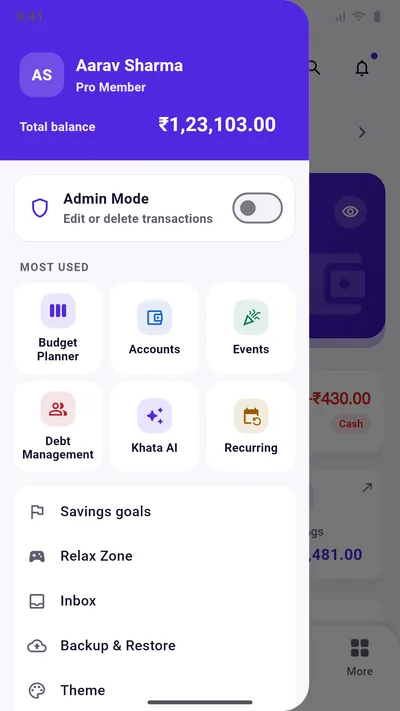
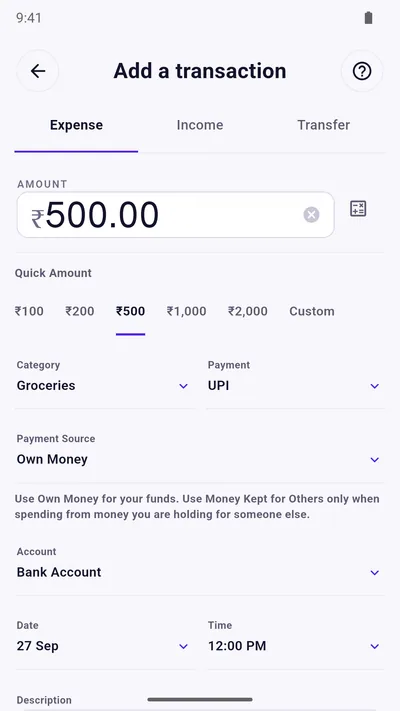
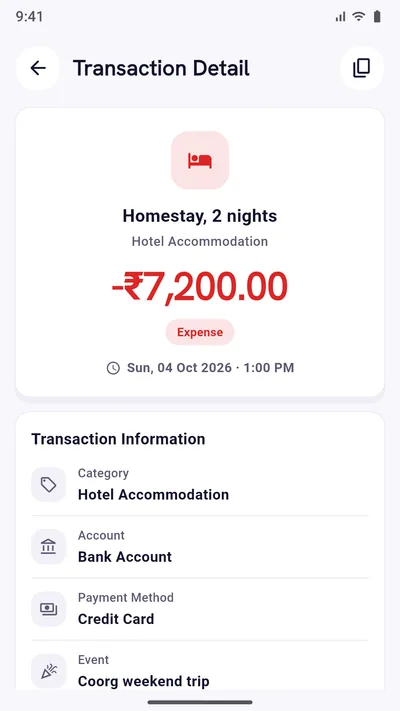
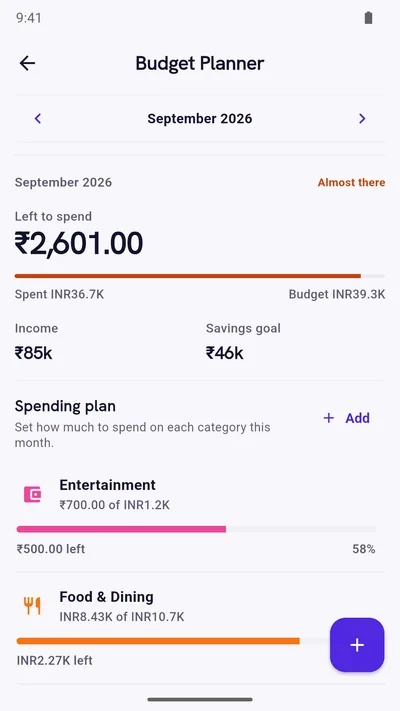
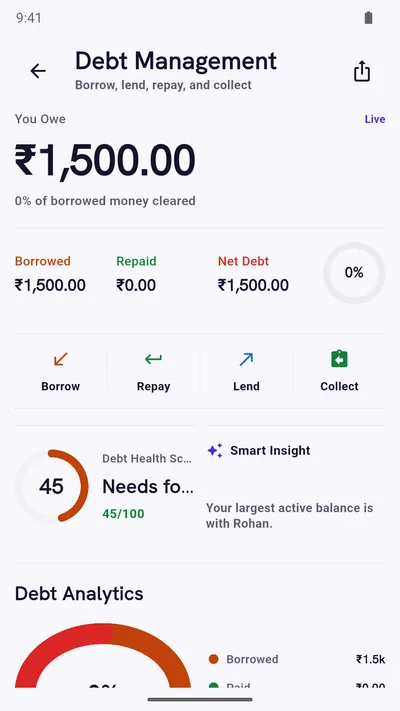
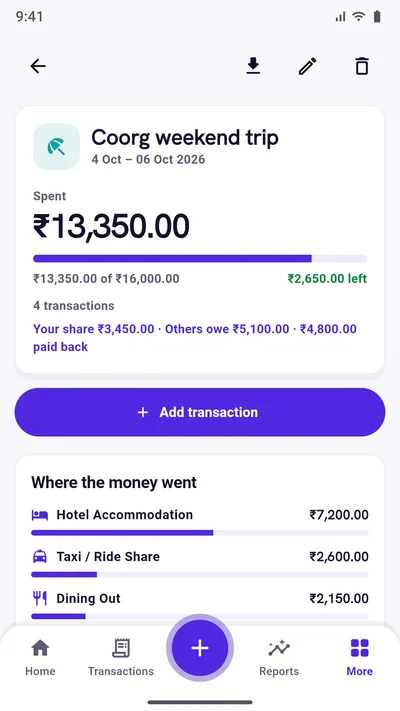
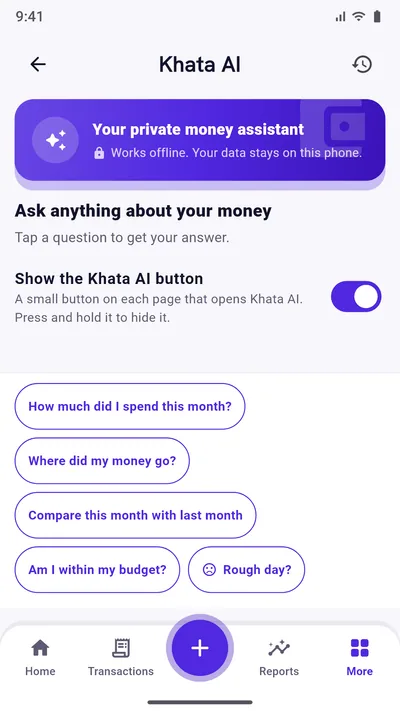
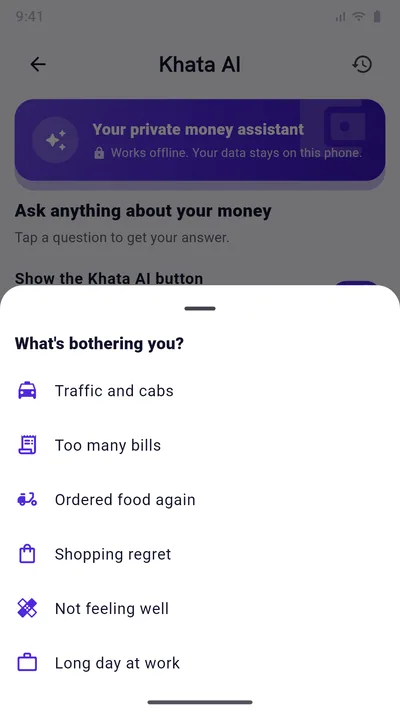
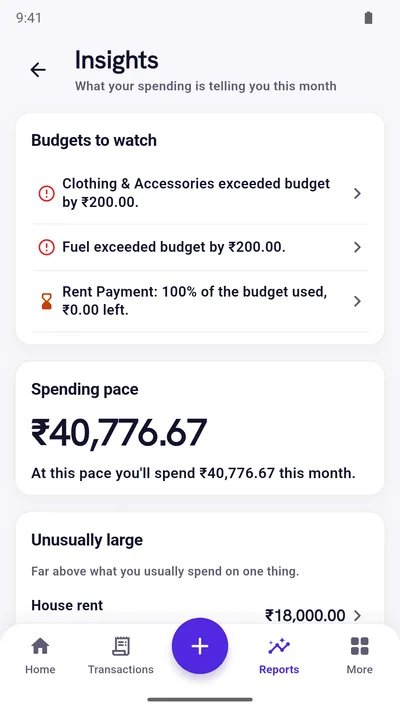
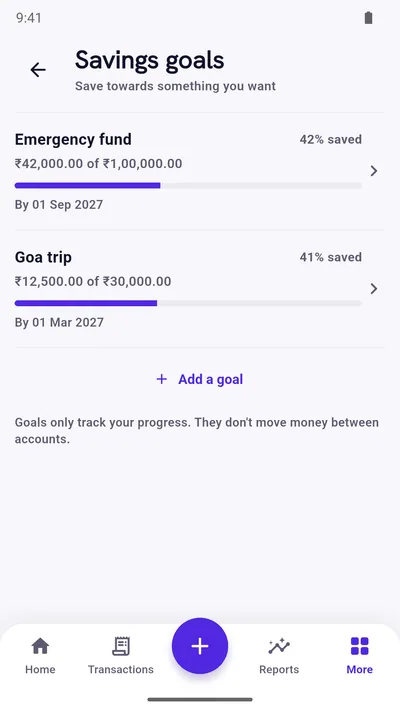
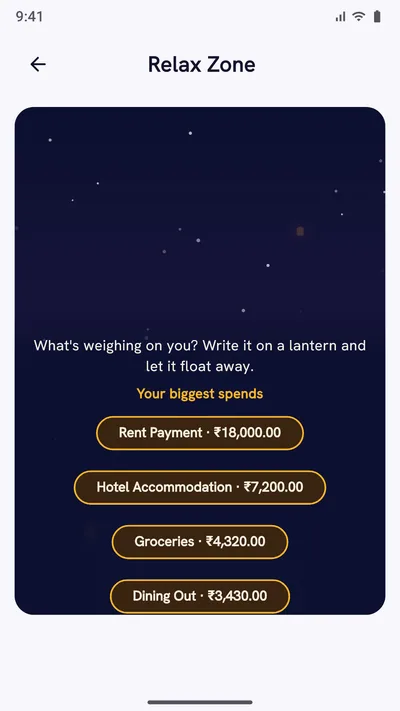
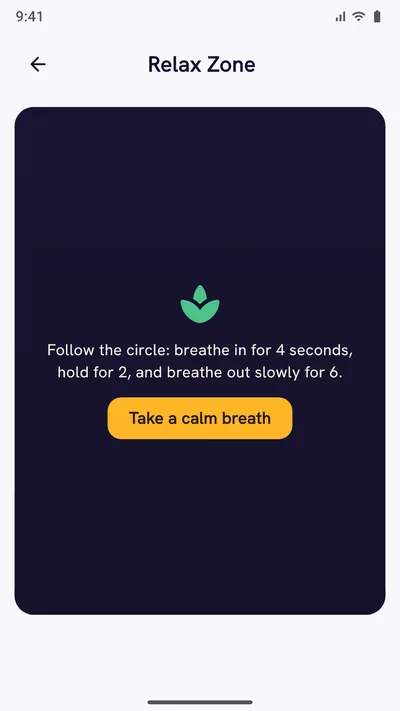
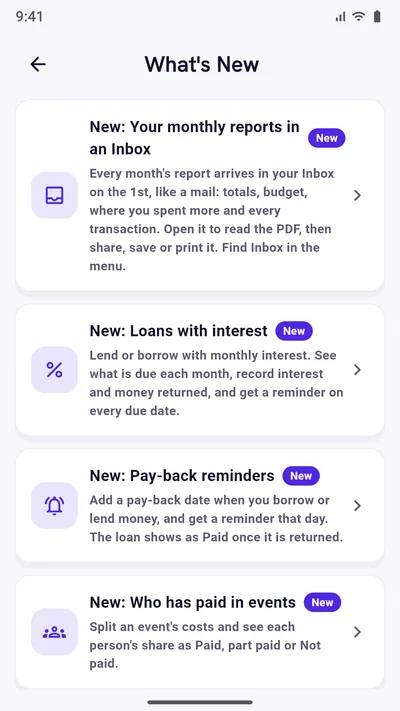
Screenshots show sample data, taken from the app (version 1.6.2).
See it move
Watch it in action
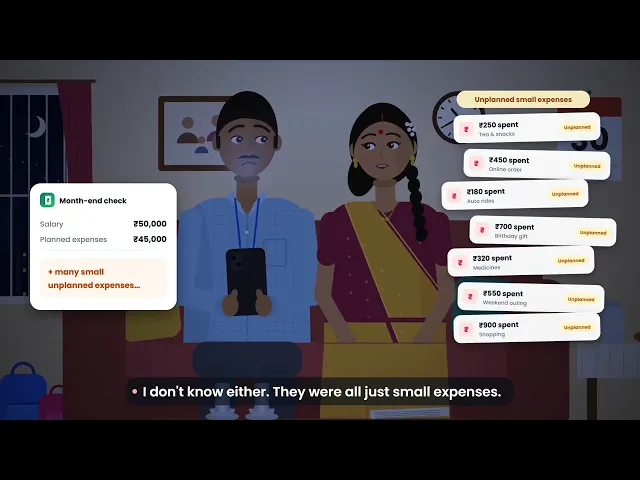
The real app, not a mockup: transactions, account balances, automating rent and subscriptions, savings trends and more. Then three short stories about where a monthly salary goes.


Video guides
Learn each part in about two minutes
Short how-to videos from the Dailyin channel: adding a transaction, setting up accounts, planning a budget and reading reports. They also play inside the app, under More, then Video Guides.

How to add a transaction
Record an expense, income or transfer step by step: amount, category, payment method and account.
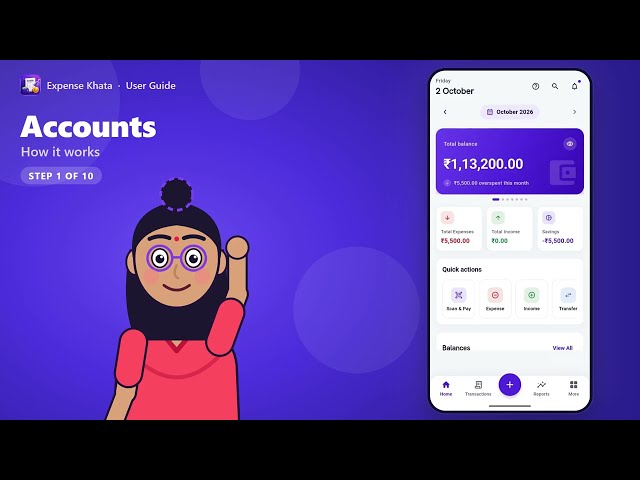
Accounts
Set up bank, cash and wallet accounts, and move money between them.

Budget Planner
Plan your month with income, category limits and overspend warnings.
Privacy
Your money records are yours
Most finance apps ask you to sign up, then keep your history on their servers. Expense Khata works the other way round.
- No account, email or phone number needed to start.
- Records live in a database on your phone. There is no Expense Khata server holding them.
- No SMS reading and no bank linking.
- Optional PIN and fingerprint lock (Premium), with a recovery question in case you forget the PIN.
- Backups, exports, sync and the monthly email report only happen when you turn them on, and Drive files stay in your own Google account.
- Scan & Pay hands the payment to your UPI app. We never see your UPI PIN or bank details.
For full honesty: the free version shows ads from Google AdMob, which process some device data under Google’s own policies. Details are in our privacy policy, and there is more in what stays on your phone and what may leave it.
How it works
From install to insight in three steps
- Install and choosePick your language and country. Your currency and number format are set for you, lakh grouping included.
- Add what you spendLog expenses and income as they happen, or in one sitting at the end of the day. Cash and UPI both count.
- See what it meansCheck your dashboard, tap an account to see where its money went, and set a budget for next month.
Free and Premium
Start free. Pay once, only if you want to.
Free
Supported by ads
- Track income, expenses and transfers
- One account of each type, each with a card view
- Credit cards with statements, payments and EMIs
- Budget Planner: your month’s plan and category limits
- Safe to spend, “Worth it?”, the savings jar and the money check
- Weekly limits and the weekly review
- This month’s reports
- Borrow and lend records, with pay-back reminders
- One running bank loan with its EMI schedule and reminders
- Relax Zone
- Two savings goals, savings history and your savings journey
- Daily and weekly reminders
- Try Scan & Pay with three UPI payments
- Export and import all your data as CSV
- All 11 languages
Premium
One-time purchase, price shown in your local currency
- Everything in Free, with no ads
- More than one account of the same type
- Scan & Pay with no limit: scan a UPI QR, pay in your UPI app, and the expense saves itself
- Backup file and Google Drive backup and restore, which waits for the internet when you are offline
- Sync between your devices
- PIN and fingerprint lock, with a recovery question
- Reports for earlier periods, report export, Insights and Compare months
- Monthly report Inbox and email report
- Loans with interest, with a schedule and reminders
- More bank loans, the prepayment and rate-change planner, and a loan PDF
- Spending patterns, the subscription check and all three monthly saving ideas
- Split event costs and see who has paid
- Advanced budgets: groups, copy last month, templates
- Recurring rules with auto-add
- Unlimited savings goals
- Khata AI: ask about your money, offline, and pin questions to your home screen
- Ten more app themes
- Home-screen widget and launcher shortcuts
- Receipt photos and the spoken month summary
- Your own categories and tags
If you already had Expense Khata installed when a feature moved to Premium (the changes made in late September and early October 2026), that feature stays free for you.
Made for
Whoever keeps the household accounts
Money guides
Short reads on tracking and budgeting
The Real Cost of a Bank Loan: What You Pay Beyond the EMI
A 12% loan can cost you nearly 15% a year. Add up the processing fee, GST, insurance and interest on a worked ₹5,00,000 personal loan, step by step.
Forgotten Subscriptions: How to Find Them and Cut the Ones You Don’t Use
Streaming apps, cloud storage, a gym you stopped going to. Find every subscription and autopay you pay for, decide which to keep, and stop the rest.
How to Plan a Diwali Budget and Still Enjoy the Festival
Gifts, sweets, clothes and lights add up fast. Plan a Diwali budget in one sitting, with a worked ₹25,000 example and a way to track it as you spend.
Questions
Straight answers
Is Expense Khata free?
Yes. Tracking income and expenses, one account of each type (cash, bank, wallet, savings, credit card and other), credit card tracking, the Budget Planner, this month’s reports, borrow-lend records, two savings goals, daily and weekly reminders, three Scan & Pay payments and CSV export and import are free. The free version shows ads from Google AdMob. A one-time Premium purchase adds no ads, Khata AI (a private money assistant), ten more app themes, more than three Scan & Pay payments, backup and restore (a backup file or your Google Drive), sync between your devices, PIN and fingerprint lock, Insights, Compare, reports for earlier periods and report export, the monthly report Inbox and email report, loans with interest, more than one running bank loan with the prepayment and rate-change planner and a loan PDF, spending patterns and the subscription check, splitting event costs, more than two savings goals, recurring rules and auto-add, advanced budgets, the home-screen widget and shortcuts, receipt photos, the spoken month summary, your own categories and tags, and more than one account of the same type. If you already had Expense Khata installed when a feature moved to Premium (the changes made in late September and early October 2026), that feature stays free for you.
Can I track my credit card?
Yes, and it is free. Tap Add credit card and answer a few plain questions: the total limit your bank gave you and the total you have to pay right now. The app shows what you can still spend as you type. Add the bill date and payment due date, then log purchases, refunds, fees, interest and cash advances, and read each statement. When you pay the bill from your bank, pick the card and both balances update, so it never counts as spending twice. You can also turn a big purchase into EMIs. Expense Khata never asks for your full card number, CVV, PIN or OTP; only the last four digits, if you choose to add them.
How many accounts can I have?
A new free install starts with one account of each type: cash, bank, credit card, wallet, savings and other. Premium lets you add more than one account of the same type, for example two bank accounts. If you already had Expense Khata installed when a feature moved to Premium (the changes made in late September and early October 2026), that feature stays free for you.
Do I need to create an account?
No. There is no Expense Khata account. Install the app, choose your language and country, and start adding transactions. You sign in with Google only if you choose Google Drive backup or sync.
Where is my data stored?
On your phone, in a database inside the app. We do not run a server that holds your records. Data leaves your phone only when you choose to send it: exporting a file, saving a backup file, backing up to your own Google Drive, turning on sync, sharing a report, or turning on the monthly email report, which passes the PDF through our mail server to your own email address and keeps nothing.
What is Scan & Pay?
Scan any UPI QR code, pay with a UPI app on your phone, and the payment is saved as an expense straight away. Expense Khata never handles the money or sees your UPI PIN; your UPI app does the payment. You get three free Scan & Pay payments; after that it is part of Premium. How Scan & Pay works.
Can I keep two devices in sync?
Yes, with Premium. Turn on “Sync with your other devices” and your records are kept the same on each device signed in with the same Google account. The sync data lives in your own Google Drive, not on a server of ours. Sync is off until you turn it on.
Does it work without internet?
Yes. Tracking, budgets, reports and Khata AI work offline. You need a connection for ads in the free version, buying Premium, uploading to Google Drive, sync, and paying through a UPI app. If Google Drive is your backup and you are offline when a backup is due, the backup is saved on your phone and uploaded as soon as you are back online, Wi-Fi or mobile data. Scan & Pay also checks your connection before it opens the camera, and warns you if it is weak, so a payment does not get stuck halfway.
What is Khata AI?
A private money assistant inside the app (Premium). Tap a question such as “How much did I spend this month?” or “How much budget is left?” and it works out the answer from the records on your phone. It works offline, sends nothing anywhere, and shows the questions you ask most first. More about Khata AI.
Can I change how the app looks?
Yes. Pick a theme under More, then Theme. Original is free; Premium adds ten more: Ocean Blue, Peacock Teal, Lotus Pink, Aurora Glass, Galaxy, Sunset Glow, Midnight Gold, Wallet Cards, Doodle Notebook and Retro Terminal. The whole app follows the theme, including the balance and account cards on Home and Khata AI. Your entries stay the same in every theme.
Does it read my bank SMS or connect to my bank?
No. Expense Khata does not ask for SMS access and does not link to bank accounts. You add transactions yourself, or they are saved for you when you pay with Scan & Pay.
Which languages does it support?
English, Hindi, Bengali, Gujarati, Kannada, Malayalam, Marathi, Odia, Punjabi, Tamil, Telugu. You choose on first launch and can change it any time from the Profile or More screen.
Which phones does it run on?
Android 7.0 or newer. There is no iPhone version at the moment.
Can I move my records to a new phone?
Yes. Export all your data (or just your transactions) as CSV and import it on the new phone. With Premium you can also save a full backup file anywhere and restore it, or restore from your Google Drive.
Is this a loan app?
No. Expense Khata never lends money, takes interest or contacts anyone. The borrow and lend feature is only a private record of money you have given or taken between people you know, including any interest you agreed between yourselves.
What is the monthly report Inbox?
On the 1st of every month at 9:00 AM, last month’s report arrives in the app’s Inbox like a mail: totals, budget, where you spent more and every transaction, as a PDF to share, save or print (Premium). You can also have it emailed to your own Google account. How the Inbox works.
Can I track a loan with monthly interest?
Yes, with Premium. Switch on “Charges interest” when you lend or borrow and type the rate per 100, for example 2 for ₹2 per 100 a month. The app keeps a month-by-month schedule and reminds you on each due date. Loans with interest.
Can I track my home loan or personal loan EMI?
Yes. Add a home, personal, car, education or gold loan with its amount, rate and months, and the app works out the EMI, records each one on its date with the interest part, and reminds you the day before. The processing fee with GST and any insurance premium count too, so when the loan ends you see what it really cost. One running loan is free; more loans, the prepayment and rate-change planner and the loan PDF are Premium. Bank loans and EMIs.
How does Expense Khata help me save?
Home shows what is safe to spend each day after your savings target and the bills still due. After each expense you can tap “Worth it?”, and the app adds up what was not needed. Log a buy you skipped and the money goes into your savings jar. Weekly limits, a two-minute weekly review and a money check that finds spending you forgot to add help you catch leaks early.
Start with today’s spending.
Free on Google Play. No sign-up, and your records stay on your phone.
Android 7.0 or newer. Free with ads; Premium is an optional one-time purchase.