 Expense Khata
Expense tracker for Android
An expense tracker quick enough to use every day
Most expense trackers fail for one reason: they take too long. Expense Khata keeps adding a transaction short, so tracking becomes a habit instead of a chore.
- Free on Google Play
- Works offline
- No sign-up
Why it sticks
Designed around the habit, not just the numbers
Tracking works when it is cheap to do. That is the idea behind every screen.
Quick amounts
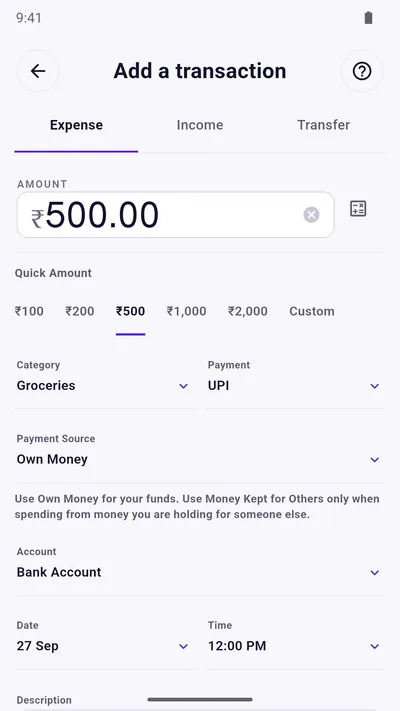
Tap ₹100, ₹200, ₹500, ₹1,000 or ₹2,000, or type any amount. Pick a category and payment method and you are done.
Cash, UPI and cards together
Payment methods follow how people in India pay: UPI, cash, debit and credit cards, net banking and wallets.
Income and transfers
Record salary and other income, and move money between your own accounts without it being counted as spending.
Search and filter
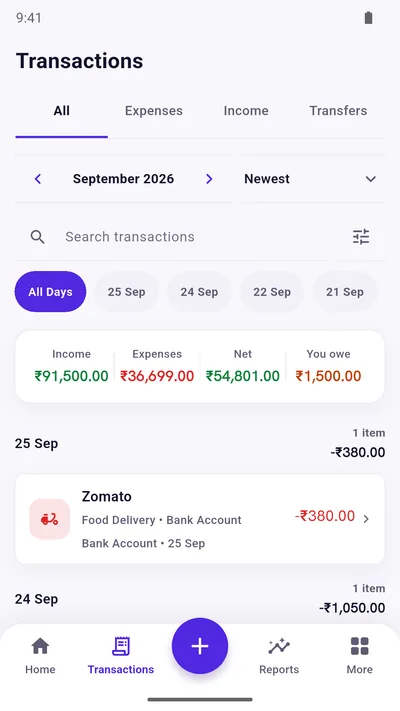
Search your transactions, jump to a day, and filter by expenses, income or transfers.
Edit without fear
Fix a wrong amount or category later. Deleted transactions go to Trash first, so a slip of the thumb is recoverable.
Reminders that help
Turn on a daily or weekly reminder so you add today’s spending before you forget it.
See the whole picture
From a list of entries to a clear month
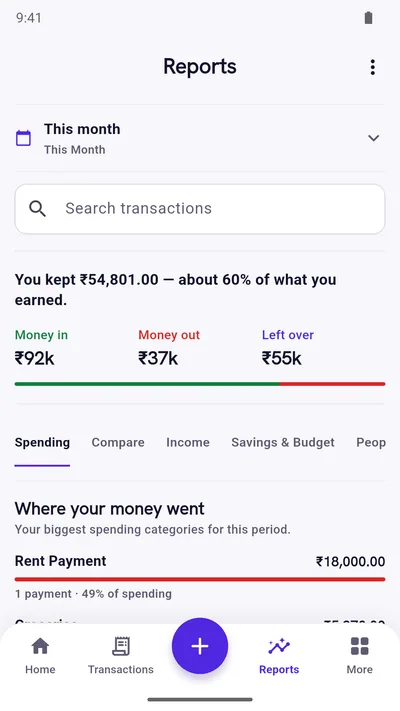
Once a few days of spending are in, the dashboard shows your balance, money in and money out. Reports turn it into sentences and category breakdowns, and Insights compares this month with last month.
- Category totals show your biggest spending areas first.
- Compare months side by side.
- Spot unusually large expenses and your busiest weekday.
Getting started
Your first week
- Day 1Add the last few things you paid for. Do not worry about being complete.
- Days 2 to 6Add each expense as it happens, or in one sitting each evening with a reminder.
- Day 7Open Reports. You will see where the week went, and that is enough to make one useful change.
Want a routine to follow? Read how to build a daily expense tracking system that lasts.
Questions
Good to know
Is there a free expense tracker for Android with no sign-up?
Yes. Expense Khata is free to use and needs no account. The free version shows ads; a one-time Premium purchase removes them.
Can I track cash and UPI spending in the same place?
Yes. Choose the payment method for each transaction and, if you like, the account it came from, such as Cash, Bank Account or Wallet.
Will it read my bank SMS automatically?
No. Expense Khata does not ask for SMS access. You add transactions yourself, which keeps the app private but means entries are manual.
Can I export my expenses?
Yes. You can export your transactions as a CSV file and import a CSV back into the app.
Start with today’s spending.
Free on Google Play. No sign-up, and your records stay on your phone.
Android 7.0 or newer. Free with ads; Premium is an optional one-time purchase.