 Expense Khata
Expense tracker · Budgets · Udhar khata
Know where your money goes. Keep your records private.
Expense Khata is a free expense tracker and budget planner for Android. Add spending in a few taps, set monthly limits, keep track of who owes you, and read what it all means in plain sentences.
- Works offline
- No sign-up
- Records stay on your phone
- English + 10 Indian languages

What you can do
Everything a khata should do, without the clutter
Built for daily use: quick to add to, calm to look at, and honest about what your money is doing.
Add spending in a few taps
Quick amounts, categories and payment methods like UPI, cash and cards. Add from the launcher shortcuts or the home-screen widget. Deleted entries go to Trash, not into the void.
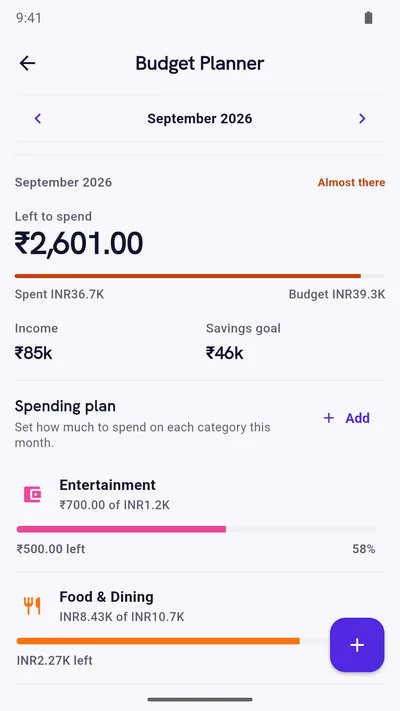
Budgets that warn you early
Set a limit for each category or group of categories. Get a heads-up when a budget is 80% used, and a warning before you save an expense that would go over.
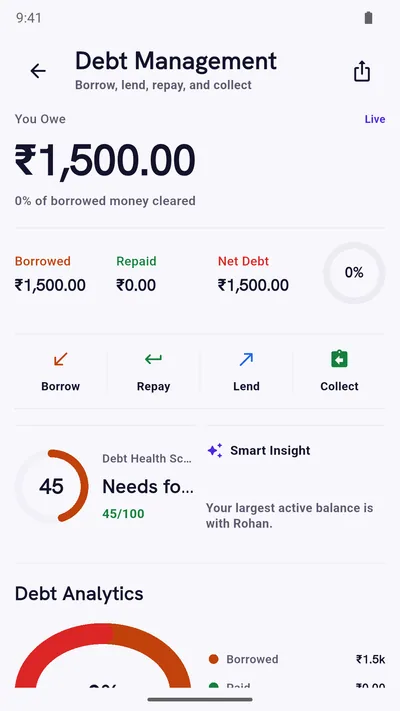
Udhar khata, person by person
Record money you lent or borrowed, part-repayments and due dates. See exactly who owes what, and since when.
Reports that read like sentences
Instead of only charts: “You kept ₹54,801, about 60% of what you earned.” Then drill into categories and compare months.
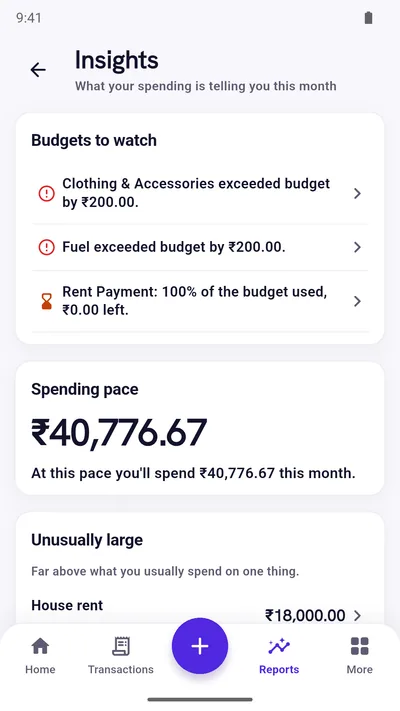
Insights that point at something
Your spending pace this month, what changed since last month, unusually large expenses, your busiest weekday and your savings rate.
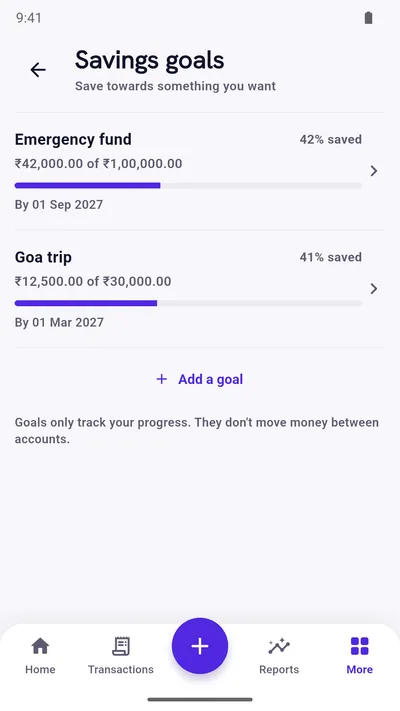
Savings goals
Name a goal, log the money you set aside, and see percent saved and the month you would finish at your recent pace.
Accounts, recurring and reminders
Track cash, bank, wallet and card balances. Add recurring rent, salary and subscriptions, and set daily, weekly or due-date reminders.
Backup and export
Export and import CSV, and keep local backups. Add Google Drive backup and restore with Premium.
In your language
English, Hindi, Bengali, Gujarati and 7 more, with dates and month names in the language you choose.
Inside the app
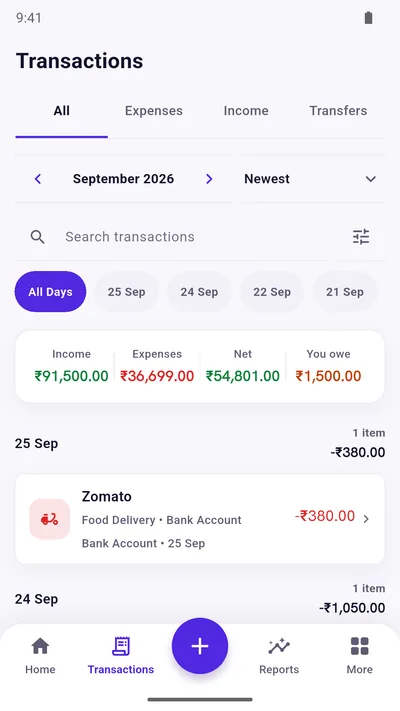
Real screens, clear by design
Every screen puts the numbers that matter first, in large type.
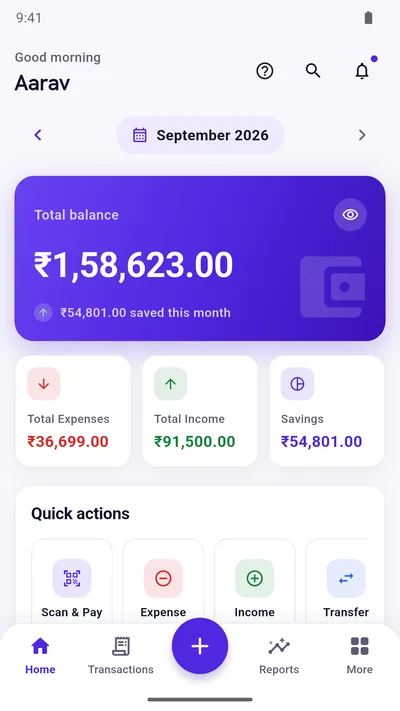
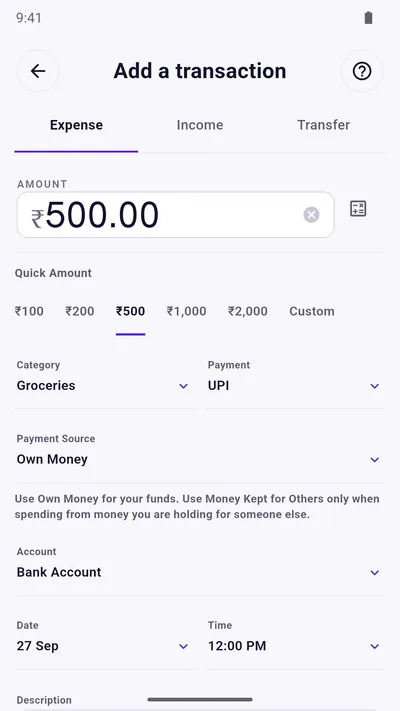
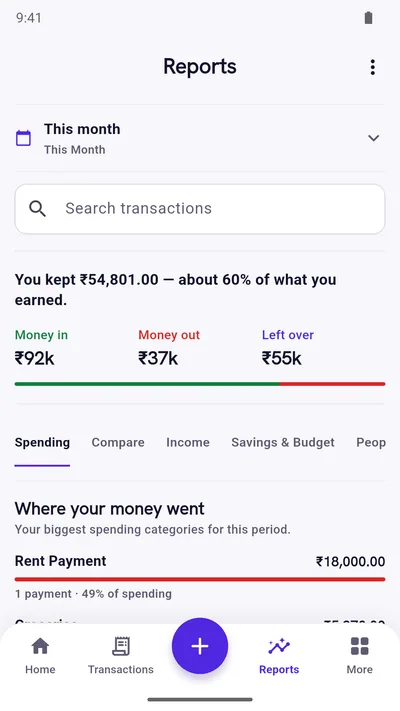
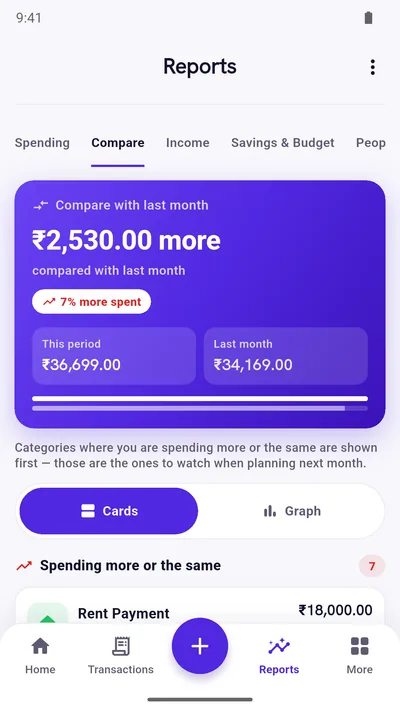
Screenshots show sample data.
See it move
Watch it in under a minute
The real app, not a mockup: transactions, account balances, automating rent and subscriptions, savings trends and more.
Privacy
Your money records are yours
Most finance apps ask you to sign up, then keep your history on their servers. Expense Khata works the other way round.
- No account, email or phone number needed to start.
- Records live in a database on your phone. There is no Expense Khata server holding them.
- No SMS reading and no bank linking.
- Optional PIN and fingerprint lock (Premium).
- Backups and exports only happen when you ask for them.
For full honesty: the free version shows ads from Google AdMob, which process some device data under Google’s own policies. Details are in our privacy policy, and there is more in what stays on your phone and what may leave it.
How it works
From install to insight in three steps
- Install and choosePick your language and country. Your currency and number format are set for you, lakh grouping included.
- Add what you spendLog expenses and income as they happen, or in one sitting at the end of the day. Cash and UPI both count.
- See what it meansCheck your dashboard, set a budget, and let Insights point out what changed this month.
Free and Premium
Start free. Pay once, only if you want to.
Free
Supported by ads
- Track income, expenses and transfers
- Budget Planner, reports and insights
- Savings goals and savings history
- Borrow and lend records
- Accounts, recurring items and reminders
- CSV export and import, local backup
- All 11 languages
Premium
One-time purchase, price shown in your local currency
- Everything in Free
- No ads
- PIN and fingerprint lock
- Google Drive backup and restore
- Custom categories and tags
Made for
Whoever keeps the household accounts
Money guides
Short reads on tracking and budgeting
How to Track Daily Expenses: A Routine That Actually Lasts
A simple daily expense tracking routine: what to record, how many categories to use, and a five-minute weekly review that makes the numbers useful.
The 50/30/20 Budget Rule, Explained With a ₹60,000 Salary
How the 50/30/20 budget rule works, a worked example with a ₹60,000 monthly take-home, and how to adjust it when rent and EMIs take more than half.
Set Up a Monthly Budget in 15 Minutes (With a Worked Example)
A step-by-step monthly budget setup: look back, list fixed costs, set limits on flexible categories, pay yourself first and choose a weekly check-in.
Questions
Straight answers
Is Expense Khata free?
Yes. Tracking, budgets, reports, insights, savings goals and borrow-lend records are all free. The free version shows ads from Google AdMob. A one-time Premium purchase removes ads and unlocks PIN and fingerprint lock, Google Drive backup and restore, and custom categories and tags.
Do I need to create an account?
No. There is no Expense Khata account. Install the app, choose your language and country, and start adding transactions.
Where is my data stored?
On your phone, in a database inside the app. We do not run a server that holds your records. Data leaves your phone only when you choose to send it: exporting a file, making a backup (local, or Google Drive with Premium) or sharing a report.
Does it work without internet?
Yes. Everything works offline. The free version needs a connection only to show ads, and buying Premium needs the Play Store.
Does it read my bank SMS or connect to my bank?
No. Expense Khata does not ask for SMS access and does not link to bank accounts. You add transactions yourself. That keeps the app private and predictable, but it does mean entries are manual.
Which languages does it support?
English, Hindi, Bengali, Gujarati, Kannada, Malayalam, Marathi, Odia, Punjabi, Tamil, Telugu. You choose on first launch and can change it any time from the Profile or More screen.
Which phones does it run on?
Android 7.0 or newer. There is no iPhone version at the moment.
Can I move my records to a new phone?
Yes. Export your transactions as a CSV file and import it on the new phone, or use backup and restore (local backup is free; Google Drive backup is part of Premium).
Is this a loan app?
No. Expense Khata never lends money, charges interest or contacts anyone. The borrow and lend feature is only a private record of money you have given or taken between people you know.
Start with today’s spending.
Free on Google Play. No sign-up, and your records stay on your phone.
Android 7.0 or newer. Free with ads; Premium is an optional one-time purchase.